Prevent Spam Donations with Cloudflare Turnstile for GiveWP
Prevent spam donations and enhance your donation form security with Cloudflare Turnstile for GiveWP. Learn how to install and set up today.

Spam donations and bot activity can be frustrating problems for fundraisers. That’s why we’re introducing the Cloudflare Turnstile integration for GiveWP, our first captcha integration, designed to prevent spam donations while keeping the donor experience seamless
Why Use Cloudflare Turnstile for GiveWP?
Cloudflare Turnstile provides a frictionless security solution for your GiveWP donation forms. Unlike traditional CAPTCHA systems that require users to select images or solve puzzles, Turnstile works in the background to prevent spam donations and verify real human interaction without disrupting the donation process.
What This Means for Your Fundraising:
- Better security. Keep bots and fraudulent activity away from your donation forms.
- Faster donor experience. No annoying challenges or image selections.
- Higher donation completion rates. Reduce form abandonment caused by frustrating verification processes.
How Cloudflare Turnstile Works
Once enabled, Cloudflare Turnstile automatically protects all Visual Donation Form Builder forms. In some cases (such as when a user is logged in), verification happens instantly and invisibly. Otherwise, donors will simply check a box before submitting their donation – no puzzles, no delays.
It’s security without the hassle, ensuring every transaction comes from a real person.
How to Set Up Cloudflare Turnstile for GiveWP
Setting up Cloudflare Turnstile for GiveWP is quick and easy. Download the file or search for the plugin inside your WordPress admin to install this add-on. Choose whichever method works best for you.
Step 1: Install and Activate the Add-on
Option 1: Download and Install the Add-on File
- Download the plugin zip file for the GiveWP Cloudflare Turnstile add-on.
- Log into your website’s WordPress admin area.
- Go to Plugins > Add New Plugin in the left side menu.
- Use the Upload Plugin option at the top of the page.
- Upload the plugin zip file and choose Install.
- Wait for the message saying the plugin was installed successfully, and choose Activate.
Option 2: Install and Activate from inside WordPress
- Log into your website’s WordPress admin area.
- Go to Plugins > Add New Plugin in the left side menu.
- Search for “GiveWP Cloudflare Turnstile.”
- Identify the correct plugin titled “Give – Cloudflare Turnstile” and the author, “GiveWP.”
- Choose Install on the plugin card.
- Wait for the message saying the plugin was installed successfully, and choose Activate.
Step 2: Connect GiveWP to Cloudflare Turnstile
- Create a free Cloudflare account (if you don’t already have one).
- In your Cloudflare dashboard, navigate to Turnstile and follow the setup instructions to create a Turnstile widget for your website.
- Cloudflare will generate a Site Key and Secret Key. You’ll need these to connect Turnstile to GiveWP.
- In your WordPress admin, go to Donations > Settings > Security > Cloudflare Turnstile.
- Enter your Site Key and Secret Key into the appropriate fields.
- Click Save Changes.
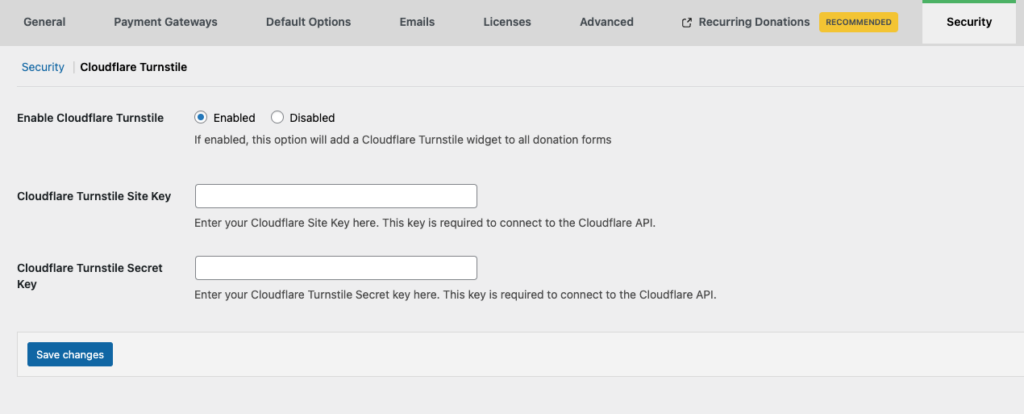
Your donation forms are now protected against bots, preventing spam donations, and donors can complete their transactions without extra verification steps.
Frequently Asked Questions
Does this protect all GiveWP forms?
Cloudflare Turnstile only applies to forms built with the Visual Donation Form Builder. Older form templates are not supported.
Can I enable Turnstile on some forms but not others?
No. Once activated, Turnstile automatically applies to all Visual Donation Form Builder donation forms.
Secure Your GiveWP Donation Forms Today
With Cloudflare Turnstile, securing your donation forms is effortless. It automatically prevents spam donations and ensures that real donors can give without extra steps.
Download the Cloudflare Turnstile add-on today and keep your GiveWP donation forms protected, hassle-free.
Amplify your fundraising with a GiveWP Plan
About the Author
Camber Clemence
Camber is a Senior Product Marketing Manager for GiveWP. In her role, she focuses on positioning GiveWP’s products to meet the evolving needs of nonprofit fundraisers. Outside of work, Camber runs her own charitable organization and volunteers with a homelessness coalition. She also enjoys long walks with her dog, kayaking, traveling, and taking trips ’round the world at Epcot.