How to Set Up Recurring Donations on WordPress
You need a solid WordPress recurring donation plugin that’s easy to use for you and your donors. Set up recurring donations on WordPress in minutes.

Recurring donations are the cornerstone of sustainable fundraising. They offer your nonprofit predictable income, deepen donor relationships, and reduce the need for constant new donor acquisition. With Give, setting up recurring donations on your WordPress site is easier than ever.
In this guide, you’ll learn what recurring donations are, why they matter, and exactly how to implement them on your WordPress site using Give.
What are recurring donations?
Recurring donations are automatic, scheduled gifts that donors commit to over time. Instead of a one-time lump sum, a donor might give $10 monthly, totaling $120 over the year—often more than they would give all at once.
This giving model helps nonprofits:
- Predict and plan budgets more accurately
- Build stronger donor relationships
- Reduce seasonal giving slumps
Why donors love recurring giving
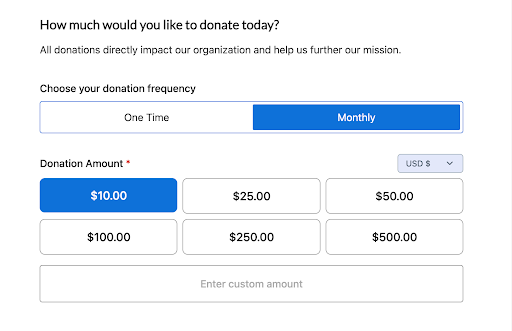
Recurring giving allows donors to support causes they care about without the friction of repeated transactions. With flexible frequencies (weekly, monthly, quarterly, annually), donors have control over how and when they give. This simplicity and flexibility makes it easier for them to stay committed.
How to set up recurring donations on WordPress
If you already use Give with WordPress to manage donations and fundraising campaigns for your nonprofit, adding recurring donations is easy. If not, our Getting Started Guide will get you up and running quickly.
Ensure you have a Give Plus, Pro, or Agency plan. The Recurring Donations add-on is included.
Step 1: Activate your license and download the ZIP file for the Recurring Donations add-on.
You can also find the add-on through the Downloads section of your My Account page.
Step 2: Navigate to the Plugins section of your WordPress dashboard and choose to upload a new plugin.
Drag and drop to upload and activate Recurring Donations.
Step 3: To set up recurring donations for a form inside a campaign, start by navigating to Give > Campaigns.
Click Edit under the campaign that contains the form you want to update.
From the campaign editor, find the donation form you wish to configure and select Edit.
In the Form Builder, click on the Build step at the top. Then select the Donation Amount and Levels block to open the settings panel.
When that block is selected, scroll down to see the Recurring Donations section at the bottom of the block settings on the right-hand side. Select to expand the section, and toggle on Enable Recurring Donations.

The options to select are the
- Frequency: Daily, Weekly, Monthly, Quarterly, Yearly
- Interval: Every 2nd, 3rd, 4th frequency, the donations will renew
- Number of Donations: How many times will the donations renew
Ongoing is the default setting; you can change it to a specific number up to 24 donations.
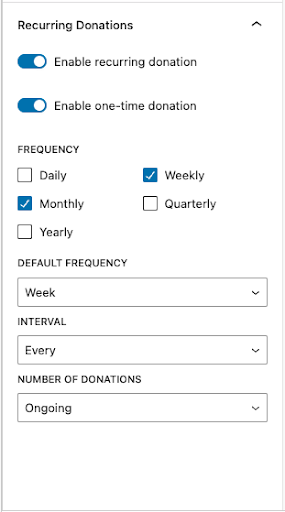
Step 4: Choose a Default Frequency from your checked options, including one-time donations. This selection will be pre-selected when the form loads, but donors can always choose a different option before giving.
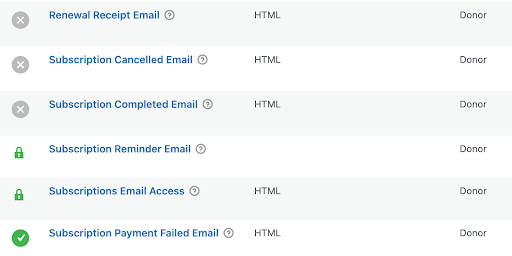
Step 5: Recurring donors appreciate clear communication. Give makes it easy to notify donors whenever their recurring donation payment processes, or if something goes wrong.
To enable these notifications (optional and recommended), go to Give > Settings > Emails > Donor Emails.
Step 6: Donors can manage their recurring donations anytime through the Donor Dashboard, which gives them more control.
The Donor Dashboard link appears:
- On the Donation Confirmation page
- In every donation receipt email sent from your site
With Recurring Donations configured and your donation form ready to go, your WordPress website can collect reliable, ongoing support from generous donors.
Why use Give for recurring donations?
Give’s Recurring Donations Add-on is a powerful tool for accepting automatic, ongoing contributions on any WordPress site.
Benefits of using Give:
- No code required
- Seamless integration with existing donation forms
- Donor dashboard for managing subscriptions
- Flexible frequency settings and default options
- Email notifications for donors and admins
Whether you’re a small nonprofit or a large organization, Give makes it easy to set up and manage recurring giving.
Help donors set up recurring donations today
Recurring donations are invaluable for building a sustainable donor funnel and a deeply engaged donor base. Simplify giving by offering your donors customizable subscriptions, and see how recurring giving makes a difference in your organization’s success in achieving fundraising goals.
All you need to get started is the Recurring Donations add-on and the Give plugin, and you can combine the powerful donor database and dashboard with this must-have feature. Learn more and get started today.
About the Author
Morgan Hugoboom
With over 10 years experience in marketing, Morgan currently supports Give, LearnDash, Kadence, and other StellarWP brands. When she’s not working, Morgan is usually eating pizza or exploring small towns in New England.