Get the Most Out of Your Donor Dashboard
Get the most out of your Donor Dashboard with these tips and tricks to make it more prevalent and accessible to your supporters.

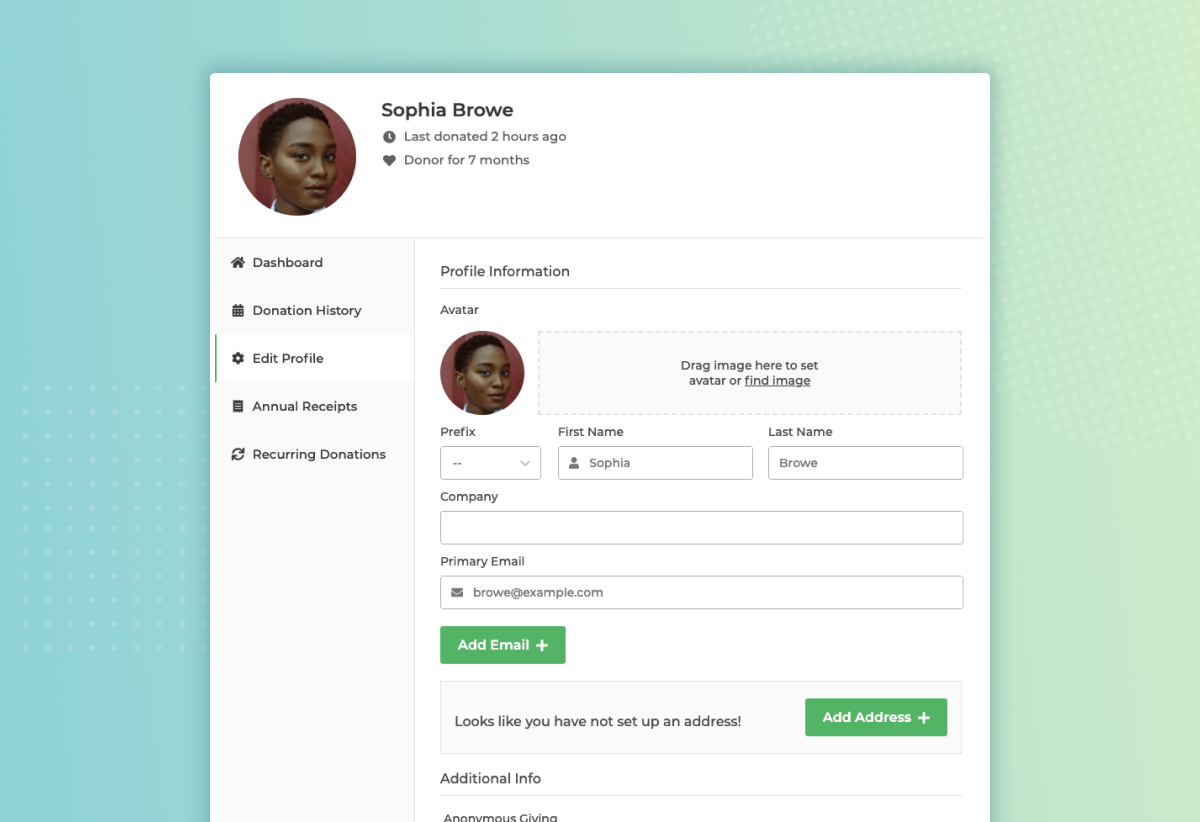
Your donors are your biggest supporters, and your Donor Dashboard is their command center. With GiveWP’s intuitive Donor Dashboard, you can empower donors to manage their giving history, download receipts, and control recurring donations from one place.
This post explains the Donor Dashboard, why it matters, and how to encourage your supporters to use it.
What Is the GiveWP Donor Dashboard?
The Donor Dashboard is a self-service portal where donors can:
- View past donations
- Access PDF and annual receipts
- Update personal information
- Manage recurring donations and subscriptions
It’s included with all Basic, Plus, Pro, and Agency plans and designed to improve transparency, trust, and retention by giving donors more control and visibility.
Key Benefits of the Donor Dashboard
Real-Time Donation Insights
Your donors want to see the difference they’re making. With the Donor Dashboard, they can access a full log of their giving history, including:
- Donation dates
- Amounts
- Fund or campaign names
- Payment methods
This level of transparency is helpful for donors; it shows that your organization is accountable and donor-focused. Reminding supporters of their past impact also encourages repeat giving.
Easy Access to Receipts
Say goodbye to manually sending tax documentation. Donors can:
- Download PDF and Annual Receipts for any donation
- Retrieve annual summaries at tax time
- Keep all their giving records in one secure place
This is especially helpful when donors prepare their taxes at the end of the year. It simplifies admin work for both your team and your supporters.
Personalized Donor Profiles
A great donor experience feels personal. With GiveWP:
- Donors can update their email or mailing address themselves
- You reduce data-entry errors and support requests
- They’re more likely to stay engaged with accurate communications
Plus, supporters can control anonymity preferences, ensuring they feel safe and in control of how their gifts are recognized.
Flexible Recurring Donation Management
Recurring donations are the backbone of many nonprofit budgets. The Donor Dashboard helps retain these critical supporters by giving them the ability to:
- Adjust donation frequency (monthly, quarterly, etc.)
- Update payment details
- Cancel or pause donations at any time
This flexibility reduces churn and builds trust by showing donors they’re not locked in, they’re empowered.
How to Promote the Donor Dashboard to Supporters
Even the best tools only work when people know how to use them. Make your donor dashboards easy to find and understand so they can access and benefit from them.
Best Practices to Encourage Usage
Add to Your Navigation Menu
Place a clear label like “My Donations” or “Donor Login” in your top menu. Consider using icons or bold colors to draw attention.
Include It in Email Receipts
Every donation receipt is an opportunity to invite donors back. Add a quick sentence like, “Need a receipt or want to update your info? Visit your [Donor Dashboard].”
Mention It in Year-End Emails
As tax season approaches, remind donors they can retrieve all their giving records with ease. Add a short blurb like, “Tax time? No problem. Your annual donation history is just a click away in your Donor Dashboard.”
Share It in Newsletters or Updates
Use storytelling here—feature a real supporter (or a fictionalized one) who benefited from using the dashboard. For example, you could say, “After moving this year, our long-time donor Susan easily updated her mailing address in her Donor Dashboard—no email needed!”
Why Self-Service Tools Like the Donor Dashboard Are Game-Changers
In today’s digital-first world, donors expect the same convenience from nonprofits as they do from online retailers or banks. A self-service dashboard:
- Reduces friction in the giving process
- Increases donor confidence
- Minimizes support emails and administrative overhead
- Encourages repeat giving through greater ease and autonomy
It’s not just about convenience, it’s about trust and long-term engagement.
Final Thought
Empowering your supporters with self-service options like the Donor Dashboard deepens engagement, strengthens trust, and frees your team to focus on your mission.
Want to get started or improve your setup? Check out our full documentation: How to Set Up the Donor Dashboard.
About the Author
Amanda Gorman
Amanda Gorman is Director of Customer Success at GiveWP where she uses her nonprofit expertise and WordPress superpowers to help folks around the world make a bigger difference in their communities. Amanda treasures spending time with her family, time in nature, studying and teaching yoga, and is possibly obsessed with Beyoncé.