Donors
The Donors page in GiveWP provides a complete overview of everyone who has given through the site. From this screen, admins can view donor details, track giving history, and manage donor records. Each donor’s profile includes contact information, donation activity, and related notes.
Articles in this section:
 Delete Donors
The Donors page of the GiveWP backend provides an overview of all donors on the site, with options to drill down to specific donors for a more detailed view. You also have the ability to sort your donors by Donor Information, Donations, and Date Created. You’ll find toggle arrows beside each menu heading that you can easily click to sort.
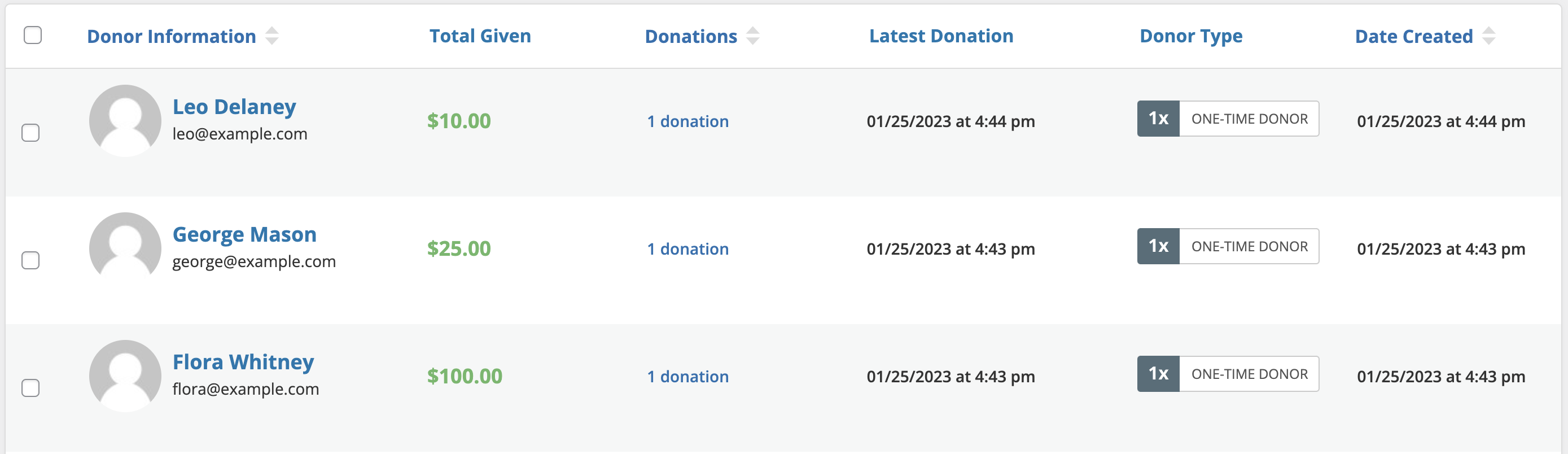
Each Donor in the table reflects the following information:
Name — This column lists the Donor ID number and Donor Name. Hovering over the row displays options to view the donor, view or modify the notes for the donor, or delete the donor. Clicking on either the name/ID or “View Donor” takes you to the same place: the individual donor’s settings page. By default, the Donor table is sorted by donor ID number.
Email — This column lists the donor’s email.
Donations — This column lists the number of donations the donor has made.
Total Donated — This column lists the total amount donated by the donor.
Date Created — This column lists the date the donor was created (first donation date).
Frequently Asked Questions
Yes, this is absolutely possible! You can find detailed instructions in this document.