Recurring Emails
The GiveWP Recurring Donations Add-on has built-in functionality to notify your donors when their subscriptions are renewed, about to renew, or expire. This article describes how to configure recurring emails.

Types of Recurring Emails
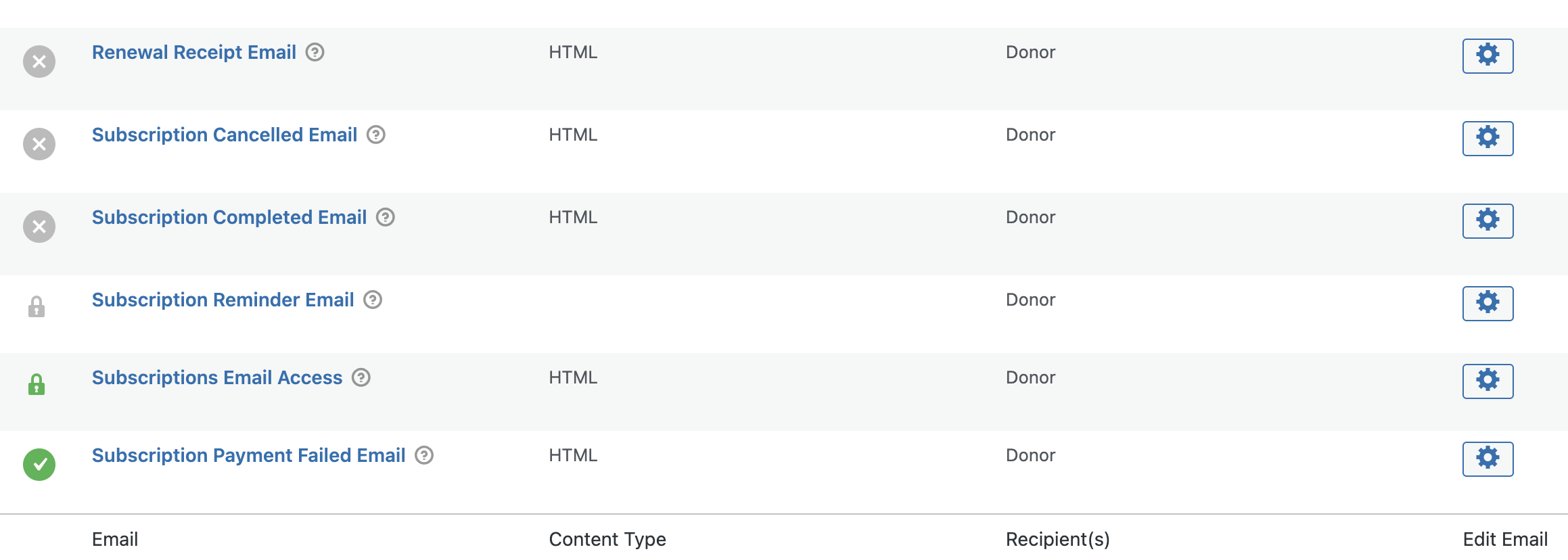
When you enable the Recurring Donations add-on, six new emails to donors and two new emails to site administrators are configurable on your site. Of the eight new emails available, two are enabled by default.
Donor Emails
- Renewal Receipt Email
- Subscription Cancelled Email
- Subscription Completed Email
- Subscription Reminder Email
- Subscriptions Email Access (enabled by default depending on the email access settings)
- Subscription Payment Failed Email (enabled by default)
Admin Emails
- Admin Renewal Receipt Email
- Admin Subscription Cancelled Email
Navigate to GiveWP > Settings > Emails where you will see the emails that can be configured in both the Donor Email and Admin emails.
Note: Subscription emails in this section are triggered only by changes recorded in GiveWP. Events that happen only at the payment gateway (without syncing back to GiveWP) will not send emails.
Example: If a subscription is cancelled at the gateway but not yet updated in GiveWP, the cancellation email will not be sent
Donor Emails
Renewal Receipt Email
This email sends whenever a recurring donation completes a cycle and the renewal is recorded on the website. It’s a great opportunity to thank the donors for their current support, and encourage them to continue assisting in different causes you might have on your site.
Subscription Cancelled Email
This email sends whenever a donor (or the site admin) cancels a recurring subscription. It’s a chance to confirm that they meant to cancel, and if not to reach out to you and get things fixed. It’s also a fantastic chance to showcase gratitude for their generosity.
Subscription Completed Email
This email sends whenever a donation completes the recurring period the donor selected. It only applied to limited subscriptions like ones set to recur 6 times and then stop (for example). It’s an excellent opportunity to thank them for their support, and encourage them to continue assisting your cause.
Subscription Reminder Email(s)
This section manages reminder emails for recurring donations. There are two types:
- Renewal reminders – sent before the next recurring donation is charged
- Expiration reminders – sent before a recurring donation ends
Unlike other emails on this page, reminder emails allow multiple messages. Because of this, the main toggle shows a lock icon instead of a simple enable/disable switch.
To configure reminder emails:
- Click the edit link in this section.
- Choose which reminder types to enable.
- Save your settings.
- Edit the specific emails to customize content and timing.

Send Renewal Reminder
The Renewal reminder is a category of emails sent in advance of a subscription that is about to renew. It’s the courtesy email to make certain that donors are not taken by surprise by their gift. You can add multiple emails and set them to send (for example) 1 week and then 1 day in advance of a renewal.
Send Expiration Reminder
The Expiration Reminder sends before the subscription expiration date on a subscription. That usually only applies to subscriptions set with an end date/number of renewals.
Subscriptions Email Access
This sends donors an email which has an email access link for obtaining access to their subscriptions details.
This email is enabled by default if you’ve enabled Email Access in the general GiveWP settings at GiveWP > Settings > General > Access Control.
{username} – The donor’s username on the site, if they registered an account.
{user_email} – The donor’s email address.
{email_access_link} – The donor’s email access link.
Subscription Payment Failed Email
This email is sent to donors when a recurring donation payment fails.
Note: This email only works with payment gateways that notify GiveWP of failed payments. If the gateway doesn’t send failure notifications, the email will not be triggered. In those cases, it’s best to rely on the gateway’s own email notifications.
Admin Emails
Admin Renewal Receipt Email
This email notifies site administrators when a recurring donation renewal is received.
- Recipients can be customized so the right team members are alerted.
- Use this email to keep staff updated about ongoing donor support.
Admin Subscription Cancelled Email
This email notifies site administrators when a subscription is cancelled.
- Recipients can be customized for your team.
- Admins can use this notification to confirm the cancellation was intentional and follow up with the donor if needed.