Import GiveWP Settings
This import allows you to import your GiveWP settings from a JSON file. Settings can either merge with your existing settings or replace them.
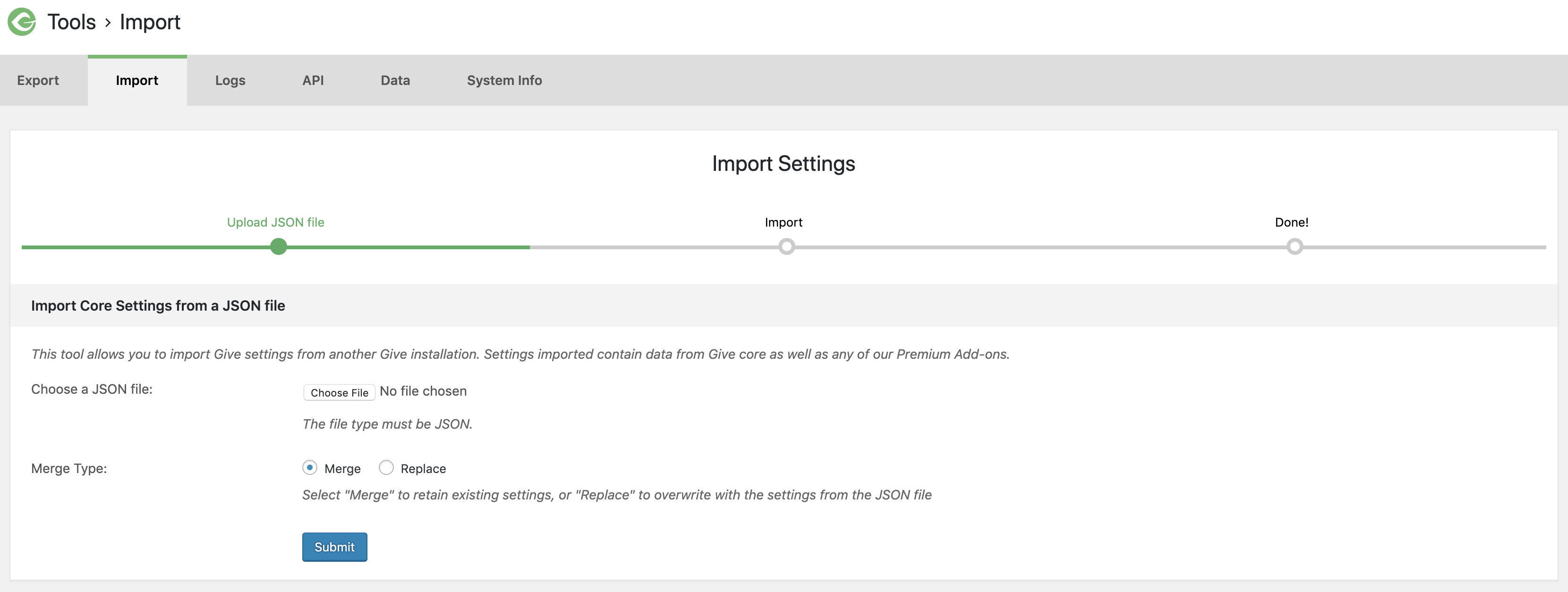
The settings import has two settings to configure.
Choose a JSON file
Setting Type: Upload Field (Required)
Click the “Choose File” button to select your GiveWP settings JSON file from your local computer.
Merge Type
Setting Type: Radio buttons
Options: Merge | Replace
Choosing Merge will update your settings with any new settings found in the JSON file you chose. For example, you might have just installed an add-on like Tributes. If you upload a new JSON file that has Tributes settings in them, and choose the “Merge” option, then all your GiveWP Core settings will not be changed, but your Tributes settings will be updated.
Choose “Replace” replaces all the settings in your site — use this option with caution.
Frequently Asked Questions about the Settings Import
If you want to import settings into a new site from an old site, then you’ll first need to export those settings from the old site. See our docs on the GiveWP Export Settings feature here. Using that export will produce a GiveWP Settings JSON file that you can import here.
Merging retains your existing settings, but updates any new settings you might have in your JSON file. This is best for when you just activated an add-on.